
Avid Pro Tools | Dock Control Surface - Product - Midwich
Avid Avid Pro Tools | Dock Control Surface
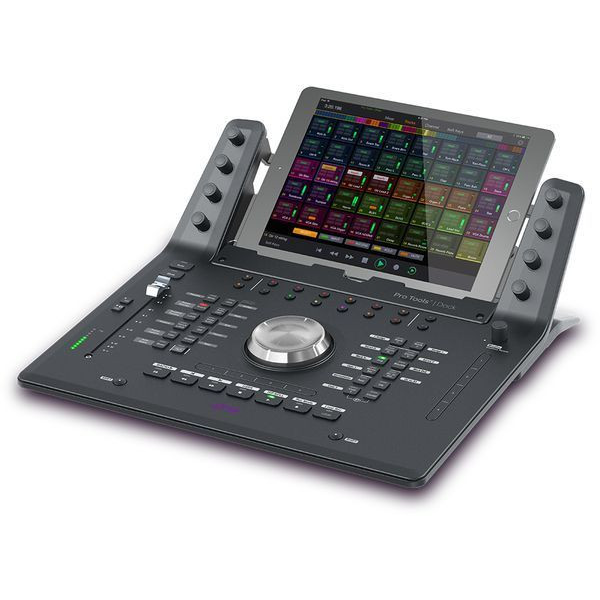
Avid Dock - 4935-00352-00
Avid Pro Tools Dock is a compact EUCON‑enabled control surface designed to work alongside an iPad running the Pro Tools Control app, providing tactile transport, automation and channel control for music and audio post‑production, enabling faster editing and mixing through a combination of physical controls and touchscreen interaction within supported DAW environments.
Key Features
- EUCON‑enabled control surface for Pro Tools
- Integrates with iPad using Pro Tools Control app
- Physical transport, automation and channel controls
- Designed for music and post‑production workflows
- Compact form factor for studio or mobile setups
Unsurpassed Tactile Control for Pro Tools
The Avid Pro Tools | Dock integrates with your iPad, extending the Pro Tools | Control iOS app's functionality with transport controls, a jog wheel, and automation controls. A channel fader, color-matched soft keys, and soft knobs round out the Pro Tools | Dock's functionality. You can use the Pro Tools | Dock as a standalone device or in conjunction with your S3, arming you with ergonomic, tactile control over your DAW. Pro Tools | Dock provides many of the center section functions of Avid's class-leading S6 control surface, such as a channel view for editing inserts, sends, pans, and more in a compact form factor.
Avid Pro Tools | Dock Features:
- Extends the functionality of the FREE Pro Tools | Control iOS app
- Provides a mix of a touchscreen and knobs, switches, and faders
- Includes transport controls and an aluminum jog wheel
- Dedicated automation controls, 16 soft keys, and 2 programmable touch strips
- Channel fader provides tactile control over your mix
- EUCON-mappable monitor control
- 8 soft knobs that work with the Pro Tools | Control iPad app much like an S6 master touch module
- S6-like channel view for editing inserts, sends, pans, and more
- Also works with Logic Pro X, Cubase, and other EUCON-enabled DAWs
- Automatically switches its controls to the application in focus on your computer
| Shipping | |
|---|---|
| Master product height | 0.0 |
| Shipping height (in.) | 0.0 |
| Master product width | 0.0 |
| Master carton quantity | 1.0 |
| Country of origin | US |
| Master product length | 0.0 |
| Quantity unit of measure | EA |
| Shipping width | 0.0 |
| Shipping depth | 0.0 |
| Shipping weight | 0.0 |
| Master product weight | 0.0 |